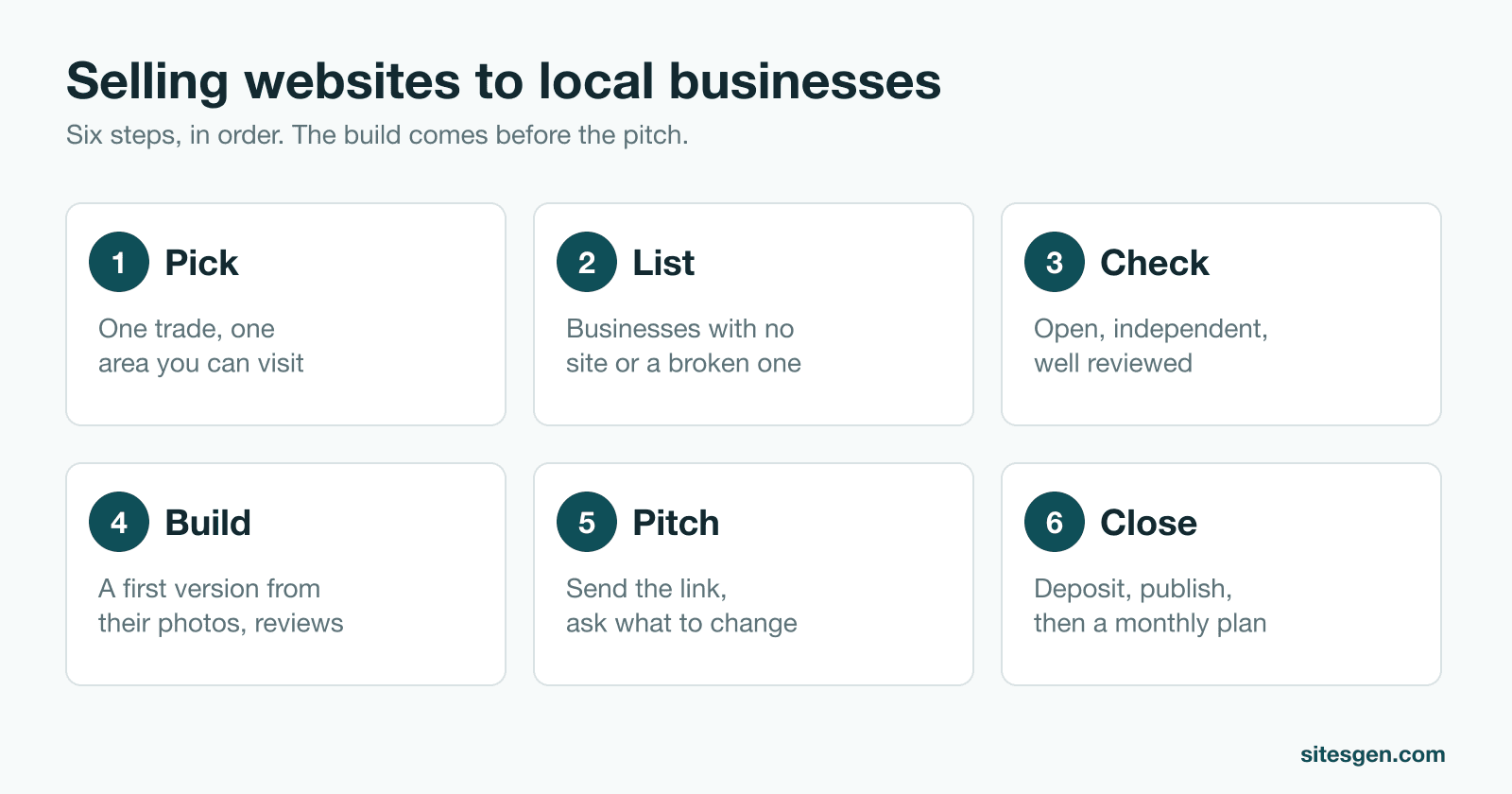
Local businesses are a good market for a new web designer: the sites are simple, the owners are easy to find, and you can often see at a glance that they need help. The hard part is not building the website. It is getting a busy owner to care. This guide walks through the whole sale in order, from choosing who to contact to getting paid.
Step 1: Pick one trade and one area
“Local businesses” is too wide to sell to. One trade gives you one pitch, one set of examples and one list of things the site must do. One area means you can walk in, and that your clients may know each other. A happy barber is a better reference to the barber down the road than any portfolio.
Choose by weighing three things:
- How many have no site. The niche finder counts this for every trade in your city.
- What a site is worth to them. One new patient is worth more to a dentist than one new customer is to a café, so the dentist will pay more.
- How fast you can reach the owner. A café owner is behind the counter. A law firm has a receptionist and a partner meeting.
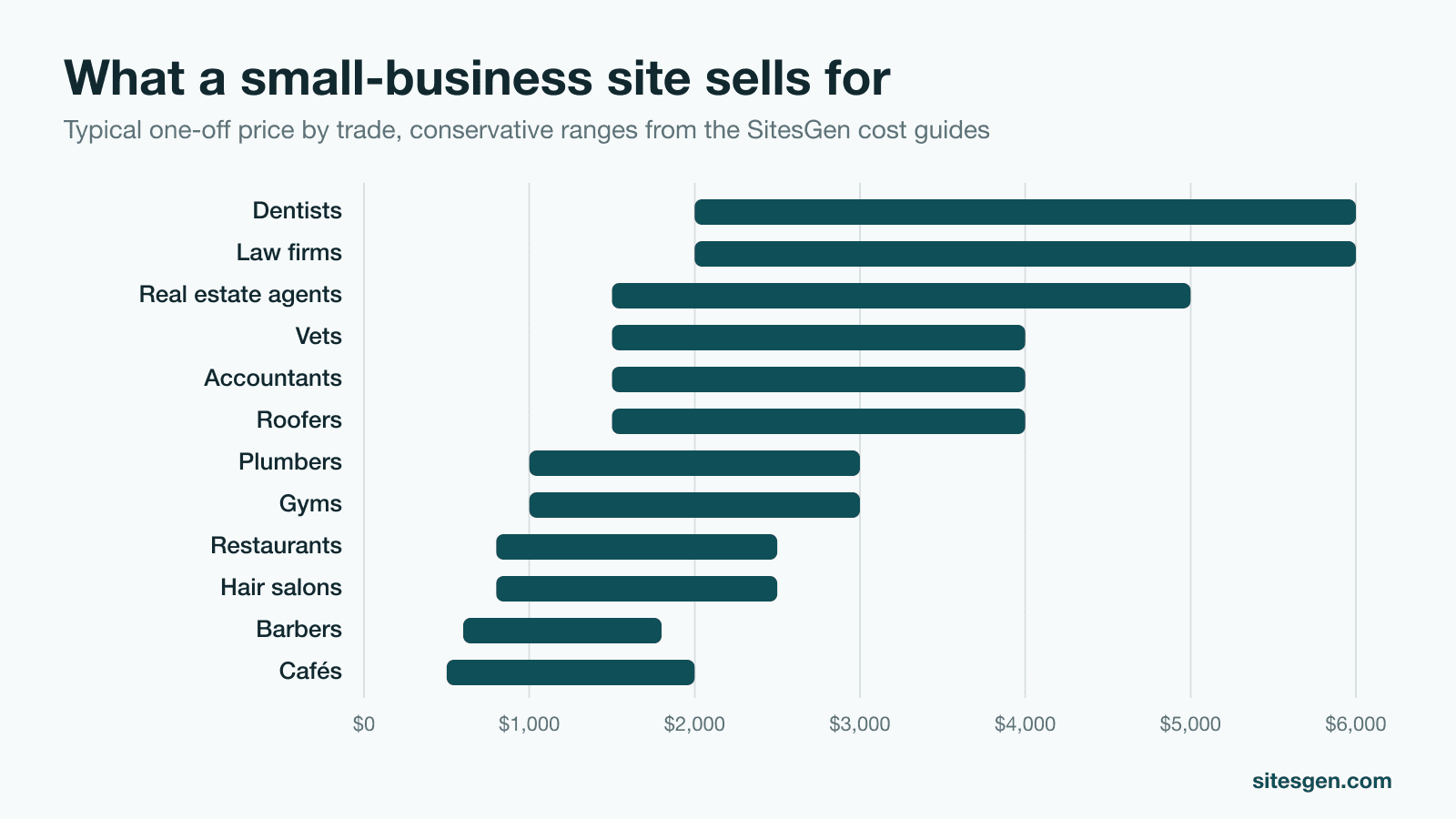
For a first sale, speed beats size. Start where the owner is easy to reach, even if the price is lower, because your first paid site is also your first proof. Then move up. The website cost guides cover what 25 trades pay and what each one needs on its site.
Step 2: Build a list of real prospects
You are looking for two kinds of business, and they need different conversations:
| No website | Broken website | |
|---|---|---|
| What you are selling | Being found at all | Fixing something that is losing customers |
| What they believe | May doubt they need one | Already believes in websites |
| Main objection | “I’m on Facebook” | “I already paid for one” |
| Free tool | Businesses without websites finder | Bad website finder |
Aim for 20 to 30 names to start. The guide to finding local businesses without a website covers four ways to build the list, including what to do by hand on Google Maps. If you want phone numbers in a spreadsheet, use the lead generator.
Step 3: Check every name before you contact it
This takes under a minute per business, and it prevents the worst opening there is: offering a site to someone who has one.
- Search the business name and town. Cross it off if a working site comes up.
- Confirm it is independent. A franchise gets its website from head office.
- Look at recent reviews. They show the business is open and that customers are looking it up.
- Note one specific thing: a dish people praise, a missing menu, opening hours that only appear on Facebook.
That last note is what makes your message read as written for them rather than sent to everyone.
Step 4: Build a first version
You can pitch with a description, or you can pitch with the thing itself. An owner who sees their own name, their dishes and their reviews on a working page has something real to respond to. The cost is your time, which is why this step needs thought. The numbers are in should you build a website before you pitch it?
Keep the first version small: one page that does the main job for that trade, and nothing you would be embarrassed to show. Do not put it on a public address yet, and do not treat it as theirs until they agree.
Step 5: Pitch the link, not your services
Your message has four jobs: show you looked, name one problem, show the site, and ask for something small.
Hi Maria, I found Luna’s on Google while looking for lunch near the station. 4.7 stars from 180 reviews, but no website, so anyone who wants your menu has to call. I put a sample together using your photos and reviews: [link]. It’s only a draft and nothing is public. What would you change?
That message asks for an opinion, not money. Opinions are easy to give, and a reply opens a conversation. Send it through details the business publishes, or go in person at a quiet time and show it on your phone. Follow up once, three or four days later, then leave it.
Cold email has rules. In the US, the FTC’s CAN-SPAM guide requires accurate sender details, an honest subject line, a postal address and a clear way to opt out. Rules differ elsewhere, so check yours before you send in volume.
Step 6: Handle the “no”, name a price, take a deposit
Most replies will not be a clean yes. “I have Facebook” and “I can’t afford it” are normal, and usually start a conversation rather than end it. Keep the website objections script nearby.
When they are interested, give one clear price, with a smaller option only if they ask. Use the website pricing calculator to work it out from the pages and extras, and web design rates by state to sanity-check it against your market. Then put these in writing:
- What is included, and how many rounds of changes.
- The payment terms. A 25% to 50% deposit is common, with the balance due before launch.
- Who owns the domain. It should be the client.
- What happens each month after launch, and what that costs.
That last point is where the business gets steadier. A build pays once. A monthly care plan pays every month, and it keeps you in touch with an owner who may refer you.
How many pitches does it take?
Nobody can give you an honest conversion rate for your town, trade and message. Plenty of guides quote one anyway. The useful move is to measure your own from day one: pitches sent, replies, calls, sales. As an illustration only, if one pitch in 25 became a sale, a goal of two sales a month would need 50 pitches. Try your own numbers in the income calculator, then replace the guess with real data after your first 30 pitches.
Mistakes that cost sales
- Selling features. Owners do not buy “responsive design”. They buy “your menu opens on a phone”.
- Promising rankings or revenue. You cannot guarantee either, and the promise sounds like every spam message they get.
- Pitching during the rush. Walking into a restaurant at noon loses the sale before you speak.
- Contacting everyone once. A short list you research and follow up with beats a long list you blast.
- Forgetting the second sale. Ask every happy client who else they know.
Where to start today
Run the niche finder on your city, choose one trade, and pull your first list from the businesses without websites finder. All of it is free. When you want the list, the sites and the pitches done for you, SitesGen scans an area, builds each business a site from its own photos and reviews, and writes the message for you to send.